Declaration of arrays, Initialization of arrays, Multi dimensional Arrays, Elements of multi dimension arrays and Initialization of multidimensional arrays. The C language provides a capability that enables the user to define a set of ordered data items known as an array.
Suppose we had a set of grades that we wished to read into the computer and suppose we wished to perform some operations on these grades, we will quickly realize that we cannot perform such an operation until each and every grade has been entered since it would be quite a tedious task to declare each and every student grade as a variable especially since there may be a very large number.
In C we can define variable called grades, which represents not a single value of grade but a entire set of grades. Each element of the set can then be referenced by means of a number called as index number or subscript.
Like any other variable arrays must be declared before they are used. The general form of declaration is:
type variable-name[50];
The type specifies the type of the elements that will be contained in the array, such as int float or char and the size indicates the maximum number of elements that can be stored inside the array for ex:
float height[50];
Declares the height to be an array containing 50 real elements. Any subscripts 0 to 49 are valid. In
C the array elements index or subscript begins with number zero. So height [0] refers to the first element of the array. (For this reason, it is easier to think of it as referring to element number zero, rather than as referring to the first element). As individual array element can be used anywhere that a normal variable with a statement such as
G = grade [50];
The statement assigns the value stored in the 50th index of the array to the variable g.
More generally if I is declared to be an integer variable, then the statement g=grades [I];
Will take the value contained in the element number I of the grades array to assign it to g. so if I were equal to 7 when the above statement is executed, then the value of grades [7] would get assigned to g.
A value stored into an element in the array simply by specifying the array element on the left hand side of the equals sign. In the statement
grades [100]=95;
The value 95 is stored into the element number 100 of the grades array.
The ability to represent a collection of related data items by a single array enables us to develop concise and efficient programs. For example we can very easily sequence through the elements in the array by varying the value of the variable that is used as a subscript into the array. So the for loop
for(i=0;i < 100;++i);
sum = sum + grades [i];
Will sequence through the first 100 elements of the array grades (elements 0 to 99) and will add the values of each grade into sum. When the for loop is finished, the variable sum will then contain the total of first 100 values of the grades array (Assuming sum were set to zero before the loop was entered)
In addition to integer constants, integer valued expressions can also be inside the brackets to reference a particular element of the array. So if low and high were defined as integer variables, then the statement
next_value=sorted_data[(low+high)/2]; would assign to the variable next_value indexed by evaluating the expression (low+high)/2. If low is equal to 1 and high were equal to 9, then the value of sorted_data[5] would be assigned to the next_value and if low were equal to 1 and high were equal to 10 then the value of sorted_data[5] would also be referenced.
Just as variables arrays must also be declared before they are used. The declaration of an array involves the type of the element that will be contained in the array such as int, float, char as well as maximum number of elements that will be stored inside the array. The C system needs this latter information in order to determine how much memory space to reserve for the particular array.
The declaration int values[10]; would reserve enough space for an array called values that could hold up to 10 integers. Refer to the below given picture to conceptualize the reserved storage space.
|
values[0] |
|
|
values[1] |
|
|
values[2] |
|
|
values[3] |
|
|
values[4] |
|
|
values[5] |
|
|
values[6] |
|
|
values[7] |
|
|
values[8] |
|
|
values[9] |
|
The array values stored in the memory.
We can initialize the elements in the array in the same way as the ordinary variables when they are declared. The general form of initialization off arrays is:
type array_name[size]={list of values};
The values in the list care separated by commas, for example the statement
int number[3]={0,0,0};
Will declare the array size as a array of size 3 and will assign zero to each element if the number of values in the list is less than the number of elements, then only that many elements are initialized. The remaining elements will be set to zero automatically.
In the declaration of an array the size may be omitted, in such cases the compiler allocates enough space for all initialized elements. For example the statement
int counter[]={1,1,1,1};
Will declare the array to contain four elements with initial values 1. this approach works fine as long as we initialize every element in the array.
The initialization of arrays in c suffers two draw backs
1. There is no convenient way to initialize only selected elements.
2. There is no shortcut method to initialize large number of elements.
|
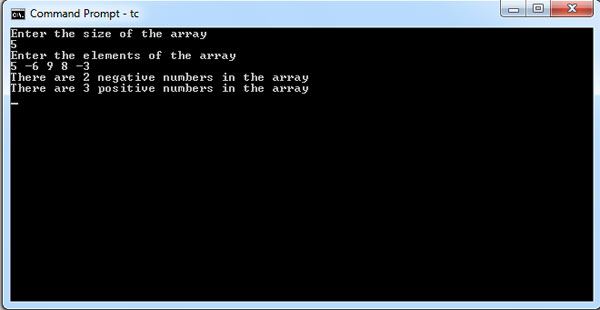
/* Program to count the no of positive and negative numbers*/ |
Often there is a need to store and manipulate two dimensional data structure such as matrices & tables. Here the array has two subscripts. One subscript denotes the row & the other the column.
The declaration of two dimension arrays is as follows:
data_type array_name[row_size][column_size];
int m[10][20]
Here m is declared as a matrix having 10 rows( numbered from 0 to 9) and 20 columns(numbered 0 through 19). The first element of the matrix is m[0][0] and the last row last column is m[9][19]
A 2 dimensional array marks [4][3] is shown below figure. The first element is given by marks [0][0] contains 35.5 & second element is marks [0][1] and contains 40.5 and so on.
|
marks [0][0] |
Marks [0][1] |
Marks [0][2] |
|
marks [1][0] |
Marks [1][1] |
Marks [1][2] |
|
marks [2][0] |
Marks [2][1] |
Marks [2][2] |
|
marks [3][0] |
Marks [3][1] |
Marks [3][2] |
Like the one dimension arrays, 2 dimension arrays may be initialized by following their declaration with a list of initial values enclosed in braces
Example:
int table[2][3]={0,0,01,1,1};
Initializes the elements of first row to zero and second row to 1. The initialization is done row by row. The above statement can be equivalently written as
int table[2][3]={{0,0,0},{1,1,1}}
By surrounding the elements of each row by braces.
C allows arrays of three or more dimensions. The compiler determines the maximum number of dimension. The general form of a multidimensional array declaration is:
date_type array_name[s1][s2][s3]…..[sn];
Where s is the size of the ith dimension. Some examples are:
int survey[3][5][12];
float table[5][4][5][3];
Survey is a 3 dimensional array declared to contain 180 integer elements. Similarly table is a four dimensional array containing 300 elements of floating point type.
|
/* example program to add two matrices & store the results in the 3rd matrix */ |
In this tutorial you will learn about Initializing Strings, Reading Strings from the terminal, Writing strings to screen, Arithmetic operations on characters, String operations (string.h), Strlen() function, strcat() function, strcmp function, strcmpi() function, strcpy() function, strlwr () function, strrev() function and strupr() function.
A string is a sequence of characters. Any sequence or set of characters defined within double quotation symbols is a constant string. In c it is required to do some meaningful operations on strings they are:
Strings are stored in memory as ASCII codes of characters that make up the string appended with ‘\0’(ASCII value of null). Normally each character is stored in one byte,
successive characters are stored in successive bytes.
|
Character |
m |
y |
|
a |
g |
e |
|
i |
s |
|
ASCII Code |
77 |
121 |
32 |
97 |
103 |
10 |
32 |
105 |
115 |
|
|
|
|
|
|
|
|
|
|
|
|
Character |
|
2 |
|
( |
t |
w |
o |
) |
\0 |
|
ASCII Code |
32 |
50 |
32 |
40 |
116 |
119 |
41 |
0 |
0 |
The last character is the null character having ASCII value zero.
Following the discussion on characters arrays, the initialization of a string must the following form which is simpler to one dimension array.
char month1[ ]={‘j’,’a’,’n’,’u’,’a’,’r’,’y’};
Then the string month is initializing to January. This is perfectly valid but C offers a special way to initialize strings. The above string can be initialized char month1[]=”January”; The characters of the string are enclosed within a part of double quotes. The compiler takes care of string enclosed within a pair of a double quotes. The compiler takes care of storing the ASCII codes of characters of the string in the memory and also stores the null terminator in the end.
|
/*String.c string variable*/ |
In this example string is stored in the character variable month the string is displayed in the statement.
printf(“The string entered is %s”, month”);
It is one dimension array. Each character occupies a byte. A null character (\0) that has the ASCII value 0 terminates the string. The figure shows the storage of string January in the memory recall that \0 specifies a single character whose ASCII value is zero.
|
J |
|
A |
|
N |
|
U |
|
A |
|
R |
|
Y |
|
\0 |
Character string terminated by a null character ‘\0’.
A string variable is any valid C variable name & is always declared as an array. The general form of declaration of a string variable is
Char string_name[size];
The size determines the number of characters in the string name.
Example:
char month[10];
char address[100];
The size of the array should be one byte more than the actual space occupied by the string since the complier appends a null character at the end of the string.
The function scanf with %s format specification is needed to read the character string from the terminal.
Example:
char address[15];
scanf(“%s”,address);
Scanf statement has a draw back it just terminates the statement as soon as it finds a blank space, suppose if we type the string new york then only the string new will be read and since there is a blank space after word “new” it will terminate the string.
Note that we can use the scanf without the ampersand symbol before the variable name.
In many applications it is required to process text by reading an entire line of text from the terminal.
The function getchar can be used repeatedly to read a sequence of successive single characters and store it in the array.
We cannot manipulate strings since C does not provide any operators for string. For instance we cannot assign one string to another directly.
For example:
String=”xyz”;
String1=string2;
Are not valid. To copy the chars in one string to another string we may do so on a character to character basis.
The printf statement along with format specifier %s to print strings on to the screen. The format %s can be used to display an array of characters that is terminated by the null character for example printf(“%s”,name); can be used to display the entire contents of the array name.
We can also manipulate the characters as we manipulate numbers in c language. When ever the system encounters the character data it is automatically converted into a integer value by the system. We can represent a character as a interface by using the following method.
X=’a’;
Printf(“%d\n”,x);
Will display 97 on the screen. Arithmetic operations can also be performed on characters for example x=’z’-1; is a valid statement. The ASCII value of ‘z’ is 122 the statement the therefore will assign 121 to variable x.
It is also possible to use character constants in relational expressions for example
ch>’a’ && ch < = ’z’ will check whether the character stored in variable ch is a lower case letter. A character digit can also be converted into its equivalent integer value suppose un the expression a=character-‘1’; where a is defined as an integer variable & character contains value 8 then a= ASCII value of 8 ASCII value ‘1’=56-49=7.
We can also get the support of the c library function to converts a string of digits into their equivalent integer values the general format of the function in x=atoi(string) here x is an integer variable & string is a character array containing string of digits.
C language recognizes that string is a different class of array by letting us input and output the array as a unit and are terminated by null character. C library supports a large number of string handling functions that can be used to array out many o f the string manipulations such as:
To do all the operations described here it is essential to include string.h library header file in the program.
This function counts and returns the number of characters in a string. The length does not include a null character.
Syntax n=strlen(string);
Where n is integer variable. Which receives the value of length of the string.
Example
length=strlen(“Hollywood”);
The function will assign number of characters 9 in the string to a integer variable length.
|
/*writr a c program to find the length of the string using strlen() function*/ |
when you combine two strings, you add the characters of one string to the end of other string. This process is called concatenation. The strcat() function joins 2 strings together. It takes the following form
strcat(string1,string2)
string1 & string2 are character arrays. When the function strcat is executed string2 is appended to string1. the string at string2 remains unchanged.
Example
strcpy(string1,”sri”);
strcpy(string2,”Bhagavan”);
Printf(“%s”,strcat(string1,string2);
From the above program segment the value of string1 becomes sribhagavan. The string at str2 remains unchanged as bhagawan.
In c you cannot directly compare the value of 2 strings in a condition like if(string1==string2)
Most libraries however contain the strcmp() function, which returns a zero if 2 strings are equal, or a non zero number if the strings are not the same. The syntax of strcmp() is given below:
Strcmp(string1,string2)
String1 & string2 may be string variables or string constants. String1, & string2 may be string variables or string constants some computers return a negative if the string1 is alphabetically less than the second and a positive number if the string is greater than the second.
Example:
strcmp(“Newyork”,”Newyork”) will return zero because 2 strings are equal.
strcmp(“their”,”there”) will return a 9 which is the numeric difference between ASCII ‘i’ and ASCII ’r’.
strcmp(“The”, “the”) will return 32 which is the numeric difference between ASCII “T” & ASCII “t”.
This function is same as strcmp() which compares 2 strings but not case sensitive.
Example
strcmpi(“THE”,”the”); will return 0.
C does not allow you to assign the characters to a string directly as in the statement name=”Robert”;
Instead use the strcpy(0 function found in most compilers the syntax of the function is illustrated below.
strcpy(string1,string2);
Strcpy function assigns the contents of string2 to string1. string2 may be a character array variable or a string constant.
strcpy(Name,”Robert”);
In the above example Robert is assigned to the string called name.
This function converts all characters in a string from uppercase to lowercase.
syntax
strlwr(string);
For example:
strlwr(“EXFORSYS”) converts to Exforsys.
This function reverses the characters in a string.
Syntax
strrev(string);
For ex strrev(“program”) reverses the characters in a string into “margrop”.
This function converts all characters in a string from lower case to uppercase.
Syntax
strupr(string);
For example strupr(“exforsys”) will convert the string to EXFORSYS.
|
/* Example program to use string functions*/ |
Dinesh Thakur is a Columinist and designer with strong passion and founder
of Computer Notes. if you have any ideas or any request please get @me on Google+
![]()