JavaScript Blink Method: JavaScript Blink Method is used to display a specified string in blink tags. JavaScript Blink Method returns the string with the tag <BLINK> surrounding it, like this:
<blink>string</blink> Assuming you have assigned a string to a variable, you call these JavaScript Blink Method as follows:
String_variable.blink(); You can see in the given example that we have used the JavaScript Blink Method that will display a blinking specified string.
1. Open a new HTML document in your preferred HTML or text editor.
2. Create the body of the document with opening and closing body tags:
<body>
</body>
3. Insert a script block in the body of the document:
<script language="JavaScript">
<!--//
-->
</script>
4. Create a variable named String_variable and assign the value “Hello JavaScript” to it:
var String_variable = "Hello JavaScript" 5. Use the document.write method to display the value of the variable as altered by each of the formatting methods.
<!DOCTYPE html PUBLIC "-//W3C//DTD XHTML 1.0 Transitional//EN"  " http://www.w3.org/TR/xhtml1/DTD/xhtml1-transitional.dtd ">
<html xmlns="http://www.w3.org/1999/xhtml" xml:lang="en" lang="en">
<head>
 <meta http-equiv="content-type" content="text/html; charset=iso-8859-1" />
   <title>JavaScript blink() method </title>
</head>
<body>
   <h1 style="color: blue"> javascript blink()</h1>  <hr />
   <script type="text/javascript">
   var String_variable = "Hello JavaScript";
   document.write(String_variable.blink());
   alert(String_variable.blink());
 </script>
</body>
</html>
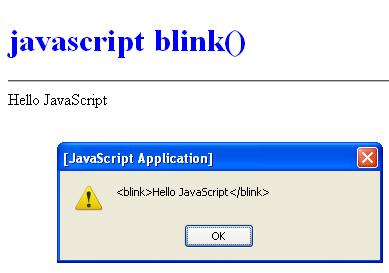
6. Open the file in a browser. You should see the text  document.write(String_variable.blink());  displayed in blinking formatting as show below and in  alert(String_variable.blink());
<blink> Hello JavaScript <blink>
7. The Output of JavaScript Blink Method program is given Below
 Dinesh Thakur holds an B.C.A, MCDBA, MCSD certifications. Dinesh authors the hugely popular