JavaScript String Format: When you create a text string in JavaScript, a string object is associated with that string. The string object provides a series of methods you can use to adjust the format of the string. JavaScript String Format can be useful when you want to display a string and quickly apply some formatting to it. The JavaScript String Format are as follows:
• big: Returns the string in big tags
• blink: Returns the string in blink tags
• bold: Returns the string in b tags
• fixed: Returns the string in tt tags (for fixed-width display)
• fontcolor: Returns the string in font tags with the color attribute set to the color you specify as an argument
• fontsize: Returns the string in font tags with the size attribute set to the size you specify as an argument
• italics: Returns the string in i tags
• small: Returns the string in small tags
• strike: Returns the string in strike tags (for a strikethrough effect)
• sub: Returns the string in sub tags (for a subscript effect)
• sup: Returns the string in sup tags (for a superscript effect)
• toLowerCase: Returns the string with all lowercase characters
• toUpperCase: Returns the string with all upper case characters
Assuming you have assigned a string to a variable, you call these methods as follows:
variableName.big();
 variableName.fontcolor("red");
variableName.toLowerCase();
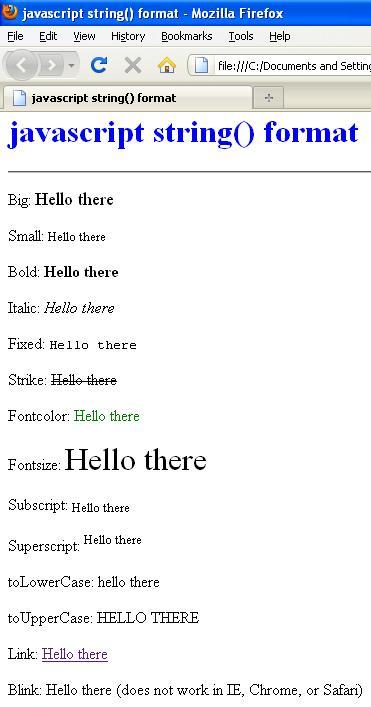
The following task displays the same string using each of these JavaScript String Format:
1. Open a new HTML document in your preferred HTML or text editor.
2. Create the body of the document with opening and closing body tags:
<body>
</body>
3. Insert a script block in the body of the document:
<script language="JavaScript">
 <!--//
 -->
</script>
4. Create a variable named myVariable and assign the value “Hello there” to it:
var myVariable = "Hello there"; 5. Use the document.write method to display the value of the variable as altered by each of the formatting methods.
<!DOCTYPE html PUBLIC "-//W3C//DTD XHTML 1.0 Transitional//EN"  " http://www.w3.org/TR/xhtml1/DTD/xhtml1-transitional.dtd ">
<html xmlns="http://www.w3.org/1999/xhtml" xml:lang="en" lang="en">
 <head>
<meta http-equiv="content-type" content="text/html; charset=iso-8859-1" />
  <title>JavaScript String Format </title>
</head>
<body>
<h1 style="color: blue">JavaScript String Format</h1>  <hr />
   <script type="text/javascript">
  var myVariable = "Hello there";
  document.write("<p>Big: " + myVariable.big() + "<br>");
  document.write("<p>Small: " + myVariable.small() + "<br>");
  document.write("<p>Bold: " + myVariable.bold() + "<br>");
  document.write("<p>Italic: " + myVariable.italics() + "<br>");
  document.write("<p>Fixed: " + myVariable.fixed() + "<br>");
  document.write("<p>Strike: " + myVariable.strike() + "<br>");
  document.write("<p>Fontcolor: " + myVariable.fontcolor("green") + "<br>");
  document.write("<p>Fontsize: " + myVariable.fontsize(6) + "<br>");
  document.write("<p>Subscript: " + myVariable.sub() + "<br>");
  document.write("<p>Superscript: " + myVariable.sup() + "<br>");
  document.write("<p>toLowerCase: " + myVariable.toLowerCase() + "<br>");
  document.write("<p>toUpperCase: " + myVariable.toUpperCase() + "<br>");
  document.write("<p>Link: " + myVariable.link(" http://ecomputernotes.com ") + "<br>");    document.write("<p>Blink: " + myVariable.blink() + " (does not work in IE, Chrome, or Safari)</p>");
</script>
</body>
</html>
Open the file in a browser. You should see the text “Hello there” displayed once for each of the JavaScript String Format.
 Dinesh Thakur holds an B.C.A, MCDBA, MCSD certifications. Dinesh authors the hugely popular